
Copying figures from one system into another is work nobody would choose. Orders go from the database into the accounts package, delivery details come out of an email and into a form, and now and again a number lands in the wrong place. Then the two systems disagree, and the afternoon goes on working out which one is right.
Where it has been automated, it’s often a script or an overnight job that stops without telling anyone. The first sign is someone asking where their report went.
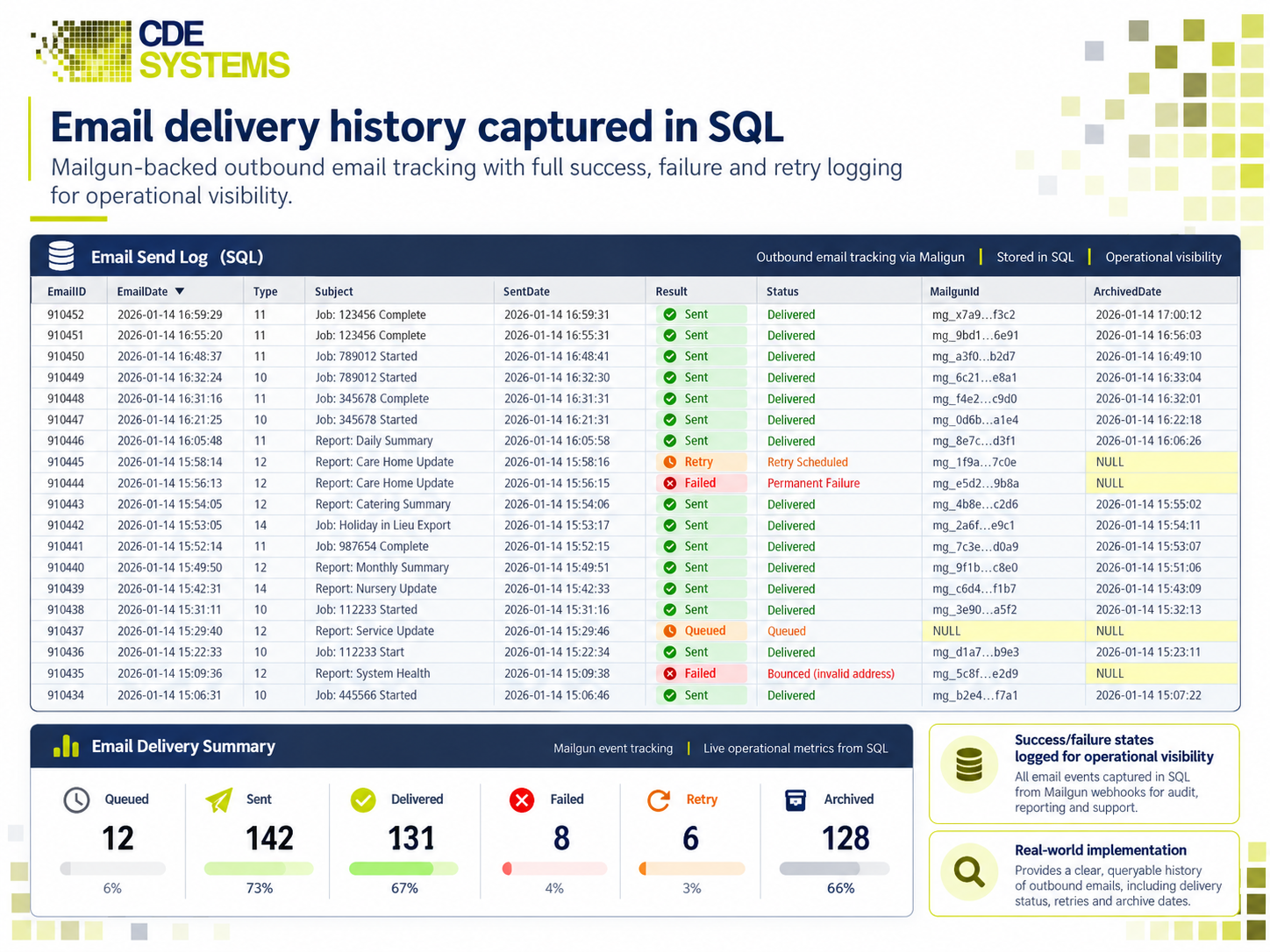
Joined up properly, a figure is entered once and turns up wherever it’s needed, and when something doesn’t match, the system says so in a log anyone can read. CDE Systems has been connecting SQL Server to other business software since 1999. We use an API where the other system has one and other routes where it doesn’t, and we build the link to keep running without someone watching it.
If SQL Server has stopped sending email
This is the most likely reason. Microsoft has retired basic authentication for SMTP client submission in Exchange Online, and SQL Server’s Database Mail has no native support for OAuth 2.0. Overnight reports, order confirmations and failure alerts that worked for years stop, and usually nobody notices until a report doesn’t arrive.
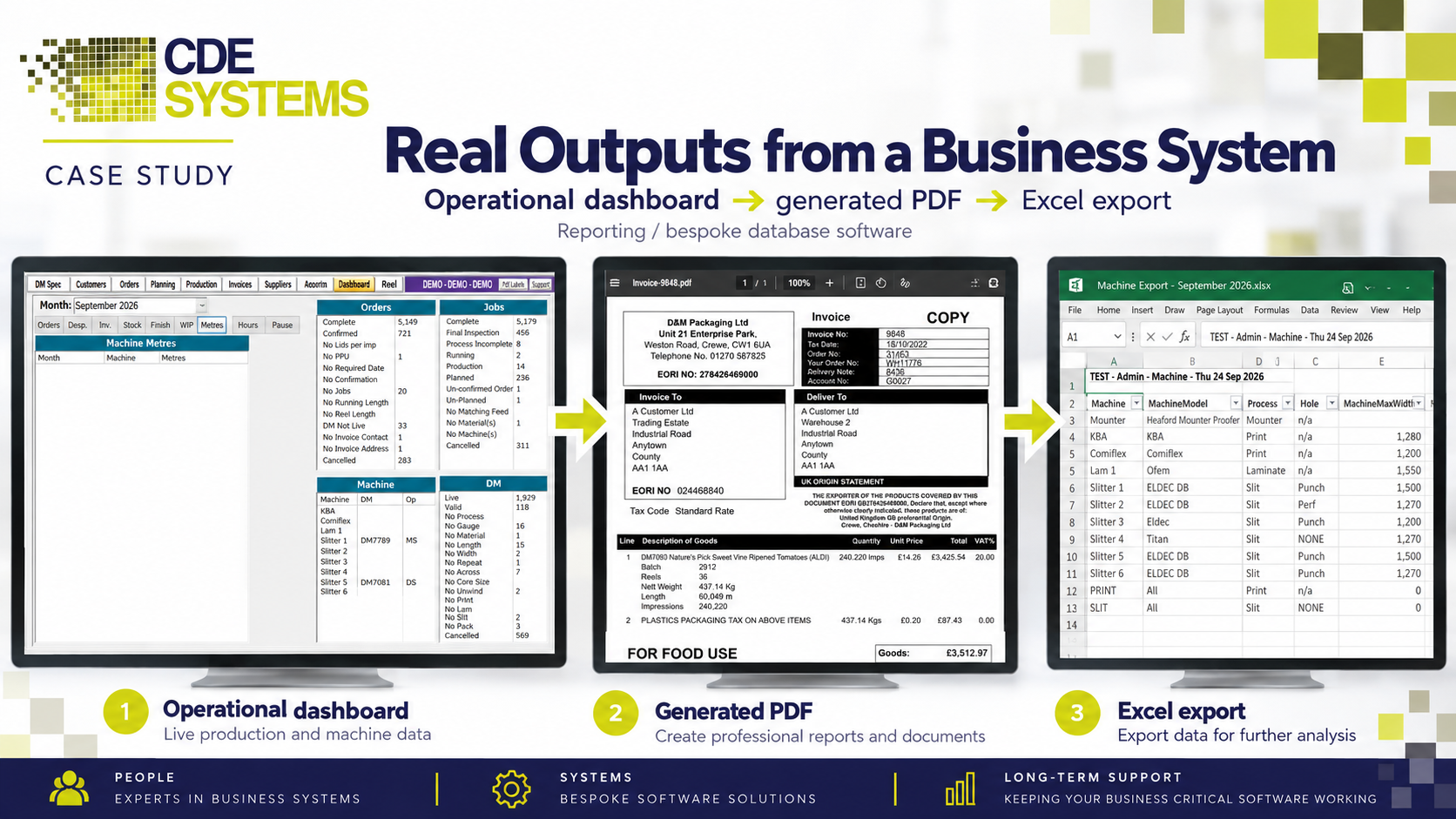
Getting it sending again. Mail can go through an SMTP relay or connector authenticated by certificate or IP address, or through Microsoft 365 or Exchange, whether that’s online, on-premises or hybrid. Where volume and delivery tracking matter, a provider such as Mailgun is worth it. Bounces, opens and failures come back as webhooks and are logged against the record, so you can see the invoice arrived. Azure Communication Services suits estates already in Azure, and Microsoft’s High Volume Email suits large internal traffic.
Making sure it arrives. Mail sent by a system gets filtered harder than mail sent by a person, and the large mailbox providers now enforce authentication on bulk senders. SPF, DKIM and DMARC need to be right. In most businesses we look at they aren’t, often because no one realised the database was sending mail at all.
Reading mail in. This is the half most people never set up. With POP3, IMAP or Microsoft Graph, an order that arrives by email is logged against the customer, and a supplier’s confirmation, POD or remittance is filed against the job. Replies are threaded onto the original record, with any attachments stored alongside.
What it looks like once it’s joined up
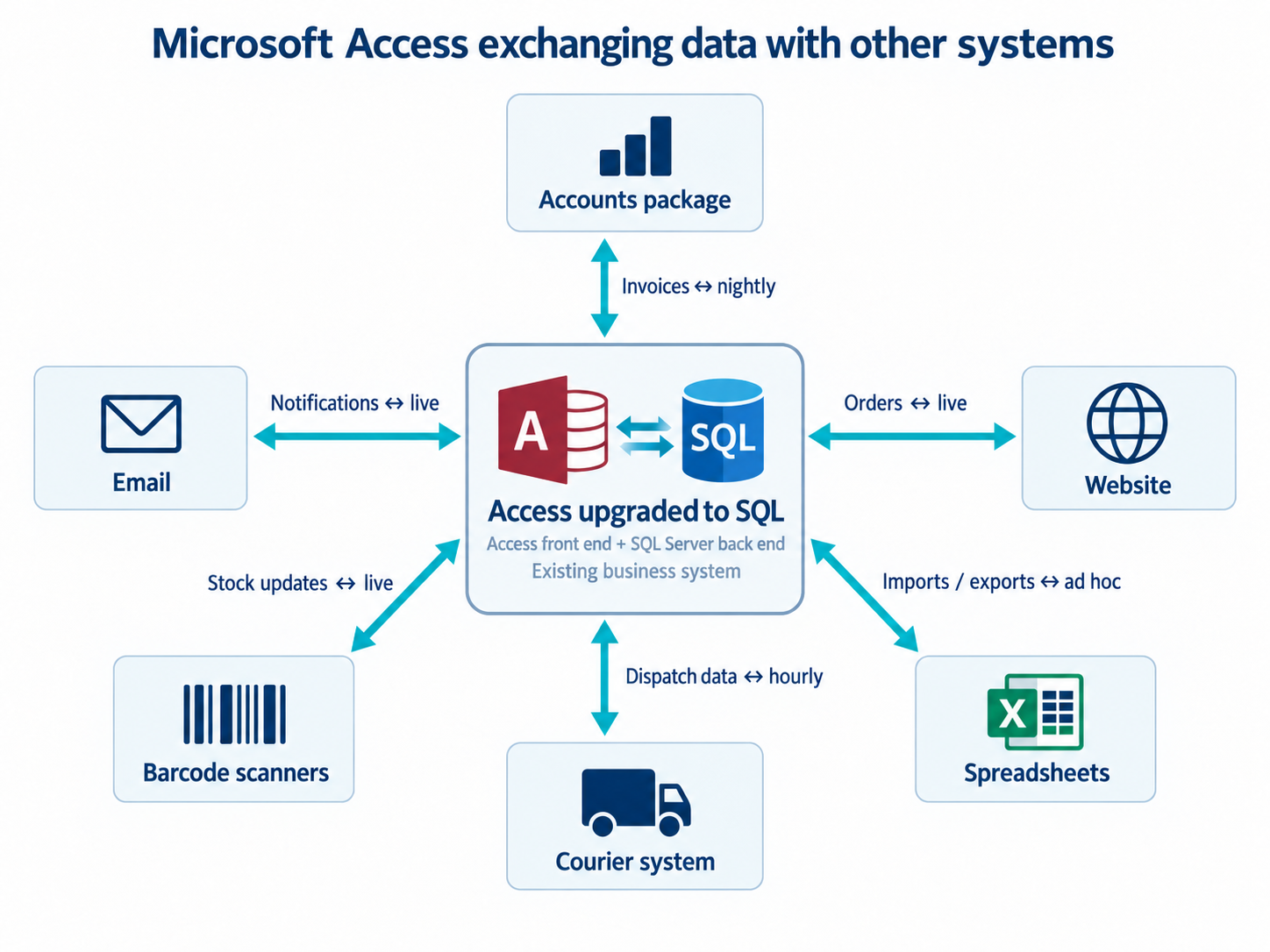
An order is raised once. The accounts package has it, the confirmation goes to the customer and is logged, and the stock figure on the website changes. When a customer exists in one system but not the other, the order doesn’t vanish. It lands in a list of exceptions with a reason next to it, and someone can put it right there and then.
The job of checking one system against another line by line goes away, and so does the job of re-typing.
What we connect SQL Server to
| System | What moves |
| Accounts | Sage 50, Sage 200, Xero and QuickBooks. Orders and invoices post across without re-keying, and customers, suppliers and nominal codes stay in step both ways. Older Sage and Mamut installations still turn up, and we still work with them |
| Email and Microsoft 365 | Quotes, confirmations, statements, job sheets, service reminders and chase letters, generated from live data, sent automatically and logged. Calendar and contact sync where it earns its keep |
| Files and documents | Drawings, certificates, photos, signed paperwork and correspondence, held against the record but stored outside the database. Access control, version history, and an audit trail of who added and who opened what |
| Barcodes and scanning | Stock, goods in, picking, dispatch, asset tracking and plant hire, with handheld or fixed scanners, label printing, and advice on the hardware. We’ve delivered barcode systems across logistics, retail and rental |
| Texts and WhatsApp | Delivery notices, appointment reminders and engineer-on-the-way messages, through the main UK SMS gateways or the WhatsApp Business API. Replies come back into the system against the record |
| Your website | WordPress and other content systems kept in step with products, prices, stock and branches. Web forms that land as records, not as emails someone has to re-type. Orders in, stock and prices out |
| Customer portals | Order status, documents, previous jobs and invoices. See customer portals and self-service |
| Surveys and feedback | SurveyMonkey and similar, triggered by the database. A job is completed, the survey goes out, and the response is logged against that job and that engineer |
Where staff are out of the building, scanning usually belongs on a phone. See mobile apps for existing systems.
How it gets connected
It depends on what the other system offers. Most of what we’re asked for now is API work.
- REST APIs over SQL Server, so web and mobile applications go through a defined interface instead of straight to the tables
- Other people’s APIs, from couriers, payment providers, e-commerce platforms, EPOS, CRM systems, suppliers and customer portals
- Webhooks, for when something has to happen the moment it happens
- SSIS packages for scheduled bulk movement, built so someone else can maintain them
- Linked servers and pass-through queries, where two SQL Server estates need to talk
- Change tracking and CDC, so other systems receive what changed and not a full copy every night
- Queues and background processing, so a slow third-party API doesn’t hold up the person waiting on it
- Files in CSV, XML or fixed-width format. A lot of business software still offers nothing else, and it works perfectly well
The part that decides whether people trust it
Making the connection is the easy half. What matters more is what happens when something doesn’t match. A customer exists in one system and not the other, a code has changed, or a posting fails.
We build the handling for that in from the start, with a log a non-technical person can read and a way to fix and resend whatever failed. Without it, people go back to checking the link by hand, and you’re paying for an integration and doing the job manually as well.
Built to keep running
- Credentials kept in Key Vault or a managed identity, never in a config file or a stored procedure
- Retries with back-off, so a supplier’s system being down for ten minutes isn’t an incident
- Failures that alert someone, so nothing fails quietly until month end
- Documentation, so the link doesn’t depend on one person understanding it
What will it cost to keep running?
Ask every supplier this, us included. We’ll give you a figure for running it as well as building it. An integration that needs looking after every Monday morning isn’t finished.
Once it’s built, it’s supported like the rest of the system. See SQL Server support and consultancy.
Keeping an office and a fleet of phones in step
At Aire Valley Catering, the office runs on an Access application over SQL Server, and the engineers use apps on their own phones, often in kitchens with no signal. Job data has to reach the office complete and in the right order, whatever the signal was doing at the time. The next stage is a defined API layer, so the apps, the web and the office system can each change at their own pace.
 Commercial Catering Service & Maintenance (field service)
Aire Valley Catering
Field service apps that work with no signal
Aire Valley Catering’s engineers work in commercial kitchens across the UK, often with no usable signal, and every job still has to be recorded. We built four production…
View case study
 Transport and logistics
ACC Worldwide
A faster SQL Server system, noticed on day one
ACC Worldwide’s staff used one business system all day, every day, and it was slow. We worked on the SQL Server environment behind it. The speed-up was immediate,…
View case study
 Travel and leisure (adventure travel and expeditions)
Jagged Globe
Keeping bookings, customer records and the website in step
Jagged Globe runs on an internal database and a booking website that have to agree every day, and sometimes they didn’t. We traced and fixed the transfers between…
View case study
What’s being typed twice?
Tell us which two systems aren’t talking and what has to move between them. We’ll come back with whether they can be joined up, how we’d do it, and what it would cost to build and to run.